| GINO Graphics Suite - GINO v9.0 |  |
 |
| GINO Graphics Suite - GINO v9.0 | |
|
In its simplest form, a facet is defined as an array of 3D vertices stored in an array of structures of type GPOINT3 using the following routine:
gDrawFacet(npts, points, [gNormals, gTextCoords, gColours].)where points is an array of 3D vertices and npts is the number of vertices in the array. The arguments gNormals, gTextCoords and gColours are all optional and are described below.
Before describing the additional facet forms, it is important to note that unlike normal polygons, facets have two faces, a front and back face, each of which can be given different material attributes and therefore appear differently when viewed from either direction. The order of the vertices as viewed by the viewer is used to determine which face is which. By default, vertices lying in an anti-clockwise order are deemed to be showing the front face, and therefore if you move round to the other side, the vertices will lie in a clockwise order, and so you will be looking at the back of the facet. This is known as the winding rule. Therefore the order in which the vertices are passed to the facet drawing routine are important in determining the 'structure' of a single or a group of facets.
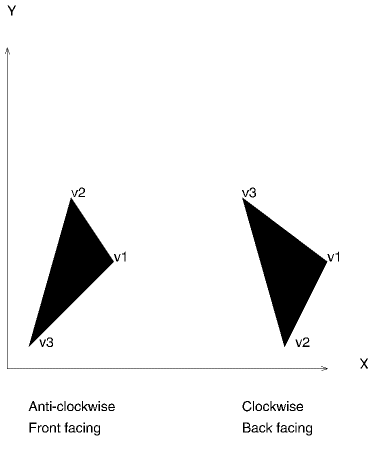 |
Facet faces |
Note the default winding rule can be reversed when setting up the lighting and shading environment (see Lighting and Shading).
The method used to calculate the correct shade of a facet in any lighting environment uses the angle that the facet lies in relation to the direction the light is shining. In actual fact, the underlying mathematics uses a vector which is perpendicular to the plane of the facet, known as its normal. GINO will automatically calculate this vector (unless alternative vectors are supplied) based on the position of the first 2 and last vertices in each facet. This single normal is called a planar normal because it applies to the whole plane of the facet.
This single vector is sufficient when flat shading is being used or where the facet represents a flat surface. If, however, curved surfaces are being constructed, and smooth shading is required, a more accurate definition of the facet is required to give an accurate visual appearance. Under these circumstances normals need to be calculated for each vertex by averaging planar normals of adjacent facets and then supplied to the gDrawFacet() routine in the gNormals optional array argument.
GINO provides a routine to return the planar normal of a set of vertices that may then be manipulated as required by the application.
gReturnPlanarNormal(npts, vertices, normal)where vertices is an array of npts points of type GPOINT3 and the planar normal is returned similarly in a structure of type GPOINT3. The following example shows the smoothing of two adjoining facets by averaging their planar normals:
[C/C++]
/* Averages planar normals for smooth surface */
include <gino-c.h>

GPOINT3 facet1[] = {60.0,30.0,20.0 ,50.0,50.0,10.0 ,10.0,10.0,5.0 },
        facet2[] = {110.0,10.0,5.0 ,50.0,50.0,10.0 ,60.0,30.0,20.0};
GPOINT3 normal1(3),normal2(3),n1,n2,na;

main()
{
   gOpenGino();
   gWogl();
   gSetMaterialIndex(3, 3);
   gSetMaterialColour(2, 2);
           gSetLightSwitch(1, GON);
           gSetShadingMode(GFLAT);

/* Get planar normals */
   gReturnPlanarNormal(3,facet1,n1);
   gReturnPlanarNormal(3,facet2,n2);

/* Average normal */
   na.x=(n1.x + n2.x)/2.0;
   na.y=(n1.y + n2.y)/2.0;
   na.z=(n1.z + n2.z)/2.0;

/* Generate facet with user supplied normals */
   normal1[0]=na;
   normal1[1]=na;
   normal1[2]=n1;

   normal2[0]=n2;
   normal2[2]=na;
   normal2[3]=na;

/* Draw facets */
   gDrawFacet(3,facet1,gNormals,normal1,0);
   gDrawFacet(3,facet2,gNormals,normal2,0);

   gSuspendDevice();
   gCloseGino();
}
[F90]
! Averages planar normals for smooth surface
use gino_f90
!
type (GPOINT3) :: facet1(3) = &
      (/ GPOINT3(60.0,30.0,20.0), &
         GPOINT3(50.0,50.0,10.0), &
         GPOINT3(10.0,10.0,5.0) /)
type (GPOINT3) :: facet2(3) = &
      (/ GPOINT3(110.0,10.0,5.0), &
         GPOINT3(50.0,50.0,10.0), &
         GPOINT3(60.0,30.0,20.0) /)
type (GPOINT3) :: normal1(3),normal2(3),n1,n2,na
!
   call gOpenGino
   call gWogl
   call gSetMaterialIndex(3, 3)
   call gSetMaterialColour(2, 2)
           call gSetLightSwitch(1, GON)
           call gSetShadingMode(GFLAT)
        !
!  Get planar normals
   call gReturnPlanarNormal(3,facet1,n1)
   call gReturnPlanarNormal(3,facet2,n2)
!
!  Average normal
   na%x=(n1%x + n2%x)/2.0
   na%y=(n1%y + n2%y)/2.0
   na%z=(n1%z + n2%z)/2.0
!
!  Generate facet with user supplied normals
   normal1(1)=na
   normal1(2)=na
   normal1(3)=n1
!
   normal2(1)=n2
   normal2(2)=na
   normal2(3)=na
!
!  Draw facets
   call gDrawFacet(3,facet1,gNormals=normal1)
   call gDrawFacet(3,facet2,gNormals=normal2)
!
   call gSuspendDevice
   call gCloseGino
   stop
   end
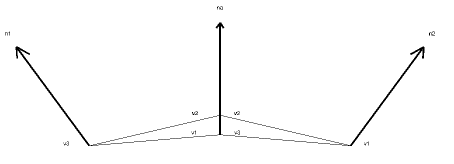 |
Averaging Normals |
In addition, or as an alternative, to the lighting effects on a facet, one or more facets may be 'covered' with a texture. This powerful technique can be used to 'drape' a predefined image over a series of facets to add a textured appearance to an object. The image may represent some abstract pattern, some additional 4D data or a photo realistic image, but in all cases the data is supplied in the same form as for a pixel image described earlier in this document (see Image Handling).
In these circumstances, the facet definition may need to define its location in relation to the image and this is achieved by supplying texture coordinates in the optional gTextCoord array argument to the gDrawFacet() routine. The texture mapping facility is fully described later in this document (see Texture Mapping).
A third type of facet is provided by the GINO library, that is not affected by lighting or texture mapping. If the gDrawFacet() routine is supplied with specific colours for each vertex in the optional gColours array, the facet will be drawn with its interior (or boundary) with graduated colours between those specified.
Therefore, along one edge, if one vertex is specified as red, and the other as yellow, the edge will be drawn with each displayable point along the edge changing from red through orange to yellow. The same applies to the interior of the facet where three or more vertices are defined.
Colours may be supplied as indices in the current colour table or as 24bit RGB triplets using the gTrueCol() function.
An example of drawing a coloured facet is shown below:
[C/C++]
/* draws coloured facets */
include <gino-c.h>

GPOINT3 facet1[] = {60.0,30.0,20.0 ,60.0,30.0,10.0 ,20.0,10.0,5.0 },
        facet2[] = {110.0,10.0,5.0 ,60.0,30.0,10.0 ,60.0,30.0,20.0};
int     cols1[] = { 2,4,5 };
int     cols2[] = { 7,4,2 };

main()
{
   gOpenGino();
   XXXXX();

/* Set up view */
   xeye=60.0;
   yeye=300.0;
   zeye=100.0;
   gDefinePerspView(xeye,yeye,zeye,0.0,-yeye,-zeye,400.0);
   gGenerateView();

/* Define smooth shading */
   gSetShadingMode(GGOURAUD,0);

/* Draw two coloured facets */
   gDrawFacet(3,facet1,gColours,cols1,0);
   gDrawFacet(3,facet2,gColours,cols2,0);

   gSuspendDevice();
   gCloseGino();
}
[F90]
! draws coloured facets
use gino_f90
!
type (GPOINT3) :: facet1(3) = &
      (/ GPOINT3(60.0,30.0,20.0), &
         GPOINT3(60.0,30.0,10.0), &
         GPOINT3(20.0,10.0,5.0) /)
type (GPOINT3) :: facet2(3) = &
      (/ GPOINT3(110.0,10.0,5.0), &
         GPOINT3(60.0,30.0,10.0), &
         GPOINT3(60.0,30.0,20.0) /)
integer        :: cols1(3) = (/ 2,4,5 /)
integer        :: cols2(3) = (/ 7,4,2 /)
!
   call gOpenGino
   call XXXXX
!
!  Set up view
   xeye=60.0
   yeye=300.0
   zeye=100.0
   call gDefinePerspView(xeye,yeye,zeye,0.0,-yeye,-zeye,400.0)
   call gGenerateView
!
!  Define smooth shading
   call gSetShadingMode(GGOURAUD)
!
!  Draw two coloured facets
   call gDrawFacet(3,facet1,gColours=cols1)
   call gDrawFacet(3,facet2,gColours=cols2)
!
   call gSuspendDevice
   call gCloseGino
   stop
   end
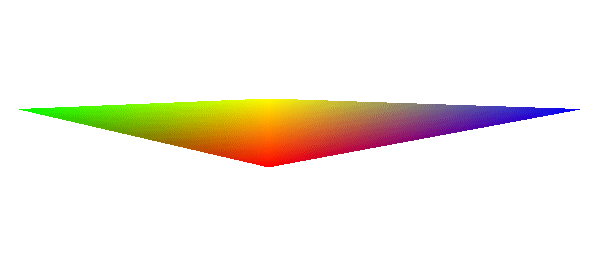 |
Coloured facets |
Note that smooth colour graduations between vertices will only occur if GGOURAUD shading is set in gSetShadingMode().